Hybrid WordPress Deployment: How wpup.in Powers Static Websites With WordPress Backend on a Separate Domain
The Problem With Traditional WordPress Hosting
WordPress powers over 40% of the web, and millions of people love it for content management. The admin panel, the plugin ecosystem, the familiar editor — it's the CMS that non-technical teams actually want to use. But traditional WordPress hosting comes with serious problems: slow page loads from PHP rendering on every request, constant security vulnerabilities from plugins and themes, frequent downtime from plugin conflicts or brute-force attacks, and expensive managed hosting to keep everything running.
What if you could keep everything people love about WordPress — the admin panel, the editor, the plugin ecosystem for content management — while eliminating every problem that makes WordPress sites slow, insecure, and fragile? That's exactly what the hybrid deployment model does, and it's the architecture behind Digital Koncept's WordPress site solution powered by wpup.in.
What Is the Hybrid WordPress Deployment Model?
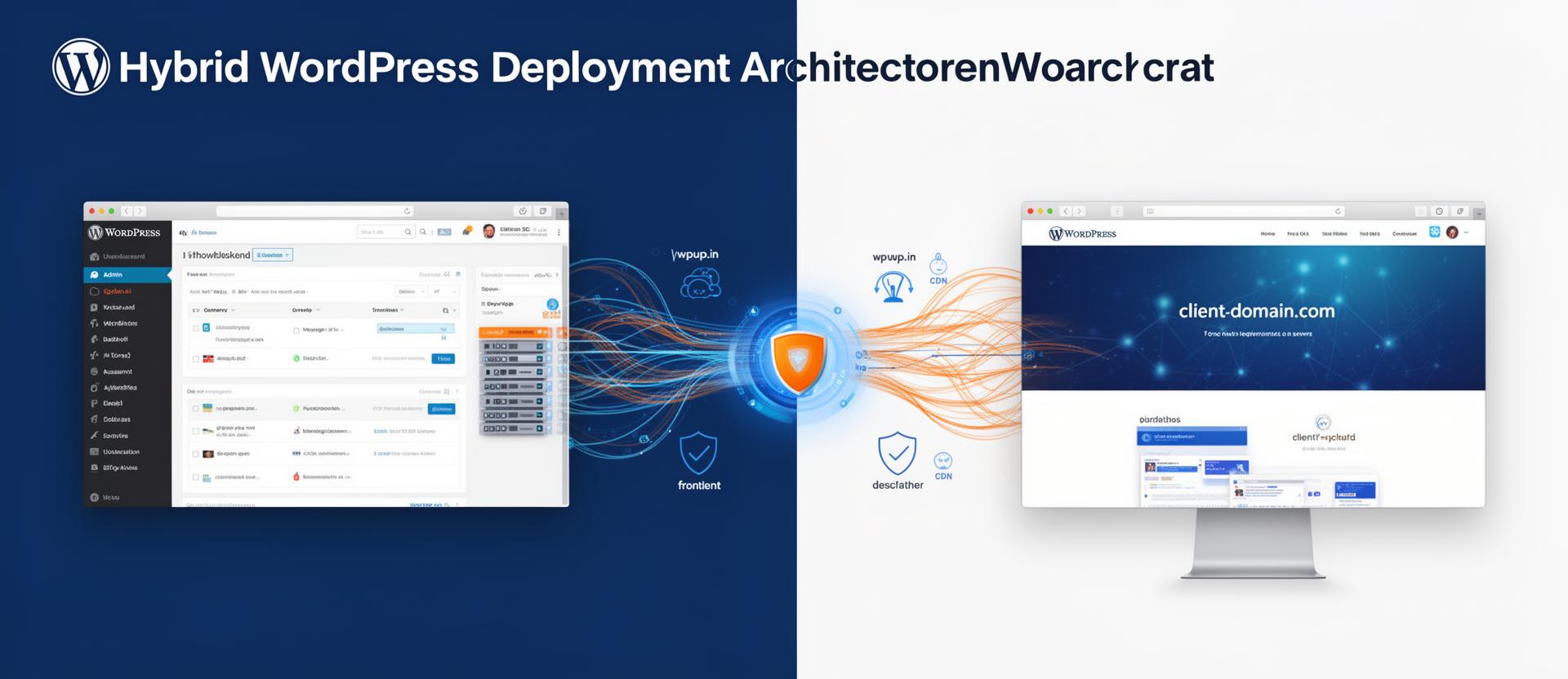
The hybrid model separates WordPress into two distinct layers: the backend (content management) runs on a dedicated WordPress installation at wpup.in/client-URL, while the frontend (what visitors see) is a static site deployed on the client's own domain — say, yourbusiness.com. The WordPress backend is used exclusively for writing, editing, and managing content. The frontend is pre-built as static HTML, CSS, and JavaScript files served from a CDN.
Here's the workflow: A client logs into wpup.in/client-URL/wp-login.php to write or update a post. After publishing, a build process generates static files from the WordPress content via REST API or WPGraphQL. Those static files are deployed to the client's domain (yourbusiness.com) on a CDN like Cloudflare Pages, Netlify, or Vercel. Visitors to yourbusiness.com see a blazing-fast static site — they never interact with WordPress directly.
This is not headless WordPress in the traditional sense where the frontend makes API calls to WordPress on every page load. In this model, the WordPress API is called only at build time. The resulting site is pure static HTML — no runtime dependency on WordPress whatsoever.
The Architecture: How wpup.in Works
wpup.in is Digital Koncept's managed WordPress backend infrastructure. Each client gets a dedicated WordPress installation at wpup.in/client-URL with full admin access. The WordPress instance runs all the familiar tools: Gutenberg editor, Yoast SEO for content optimization, ACF (Advanced Custom Fields) for structured content, and any content-management plugins the client needs.
The build pipeline connects wpup.in to the client's static deployment. When content is published or updated, a webhook triggers a static site generation process. The generator fetches all content from WordPress via REST API (/wp-json/wp/v2/) or WPGraphQL, renders it into optimized static HTML with proper semantic markup, and deploys the output to the client's CDN. The entire process takes 30–120 seconds depending on site size.
The client's domain (yourbusiness.com) points to the CDN, not to wpup.in. DNS configuration is simple: a CNAME record pointing to the CDN provider. SSL is handled automatically by the CDN. There is zero direct connection between the client's public domain and the WordPress backend.
Technical SEO Advantages of Static Deployment
Core Web Vitals are where static sites dominate. Because every page is pre-rendered HTML served from edge servers, you get sub-100ms Time to First Byte (TTFB), Largest Contentful Paint (LCP) under 1.5 seconds, zero Cumulative Layout Shift (CLS) when properly templated, and Interaction to Next Paint (INP) near zero since there's minimal JavaScript. Google's ranking algorithm heavily weights Core Web Vitals, and static sites consistently score 95–100 on PageSpeed Insights without any optimization work.
Server-side rendering at build time means every page has complete, crawlable HTML from the first byte. Search engine bots see fully rendered content immediately — no waiting for JavaScript hydration, no client-side rendering delays, no content behind API calls. This is critical for indexing speed and crawl budget efficiency, especially for sites with hundreds of pages.
Structured data (JSON-LD) is baked into every page at build time. Schema markup for Article, BreadcrumbList, FAQPage, LocalBusiness, and Organization is generated from WordPress custom fields and injected directly into the static HTML. No runtime computation, no plugin dependencies — the structured data is always present and always valid.
SEO Configuration: Sitemaps, Canonicals, and Meta Tags
The static site generator produces a complete XML sitemap at build time, listing every page with accurate lastmod timestamps derived from WordPress post modification dates. The sitemap is submitted to Google Search Console and Bing Webmaster Tools automatically via the robots.txt directive. Because the sitemap is regenerated on every build, it's always current — unlike WordPress sitemaps that can become stale or break due to plugin conflicts.
Canonical URLs always point to the client's domain (yourbusiness.com), never to wpup.in. This is enforced at the template level — the WordPress backend URL never leaks into the public-facing HTML. The robots.txt on wpup.in includes 'Disallow: /' to prevent search engines from indexing the backend. This eliminates any risk of duplicate content between the backend and frontend domains.
Open Graph and Twitter Card meta tags are generated from WordPress post metadata: featured images become og:image, excerpts become og:description, and titles become og:title. All social sharing previews are accurate and consistent because they're baked into the static HTML at build time rather than computed at runtime.
The Resilience Advantage: Client Site Stays Up Even When WordPress Is Down
This is the most important architectural benefit of the hybrid model: the client's website is completely independent of the WordPress backend at runtime. If the WordPress installation at wpup.in/client-URL goes down — due to a plugin failure, a PHP fatal error, a hosting outage, a security breach, or even a complete server crash — the client's public website continues to serve visitors normally. Every page, every image, every script is already deployed as static files on the CDN.
The only thing that stops working when WordPress is down is the ability to publish new content. Existing content, existing pages, existing blog posts — everything remains live and accessible. This is a fundamental difference from traditional WordPress hosting, where a single plugin conflict can take your entire website offline and cost you traffic, leads, and revenue.
In practical terms: if wpup.in experiences downtime for 4 hours, the client's website at yourbusiness.com has zero downtime. Visitors see no error pages, no loading spinners, no database connection errors. Google's crawler sees a healthy, fast-loading site throughout the incident. Your SEO rankings are completely protected.
Security: Attack Surface Reduced to Near Zero
Traditional WordPress sites are attacked constantly. Brute-force login attempts, plugin vulnerabilities, SQL injection through poorly coded themes, XML-RPC exploits, wp-admin enumeration — the attack surface is enormous. Every WordPress security plugin adds complexity, and many 'security' plugins have themselves been compromised.
The hybrid model eliminates the entire attack surface for the public-facing website. The static site has no login page, no admin panel, no database connection, no PHP execution, no file upload capability, and no plugin code running. It's pure HTML/CSS/JS served from a CDN with DDoS protection built in. There is literally nothing to hack on the public-facing domain.
The WordPress backend at wpup.in is secured separately with restricted IP access, two-factor authentication, automated backups, and monitoring. Because the backend doesn't serve public traffic, it can be locked down much more aggressively — you can restrict wp-admin access to specific IP ranges, disable XML-RPC entirely, and run aggressive security plugins without worrying about performance impact on the public site.
How Content Publishing Works: The Editorial Workflow
For the editorial team, the workflow is identical to traditional WordPress. You log in to wpup.in/client-URL/wp-login.php, navigate to the familiar WordPress dashboard, and create or edit content using Gutenberg or Classic Editor. You add featured images, set categories and tags, write meta descriptions in Yoast SEO, configure custom fields — everything works exactly as expected.
When you click 'Publish' or 'Update', a webhook fires to the build system. The static site generator pulls the latest content from WordPress, regenerates the affected pages (and related pages like category archives, sitemaps, and RSS feeds), and deploys the updated static files to the CDN. The new content is live on yourbusiness.com within 1–3 minutes of publishing.
Draft posts, scheduled posts, and revision history all work normally in WordPress. The static site only includes published content — drafts and private posts never appear on the public domain. Content scheduling works by triggering a build at the scheduled publish time. The editorial team never needs to interact with the build system, the CDN, or any deployment tool.
WordPress Plugins: What Works and What Changes
Content management plugins work exactly as before: Yoast SEO, RankMath, ACF, Custom Post Types, WPForms (for content structure), TablePress, and any plugin that creates or manages content in the WordPress database. These plugins are used at authoring time, and their output is captured during the static build.
Frontend plugins that inject JavaScript or modify the visitor-facing HTML need adaptation. Contact forms, live chat widgets, comment systems, and e-commerce functionality must be implemented using client-side solutions on the static site — Formspree or Netlify Forms for contact forms, Disqus or Giscus for comments, Snipcart or Shopify Buy Button for e-commerce. This is actually an advantage: these purpose-built solutions are faster, more secure, and more reliable than WordPress plugins.
Analytics and tracking (Google Analytics, GTM, Meta Pixel) are implemented directly in the static site template — no WordPress plugin needed. This eliminates the overhead of plugin-based analytics implementations that often add 200–500ms of load time.
Cost Comparison: Hybrid vs Traditional WordPress Hosting
Traditional managed WordPress hosting for a business website (WP Engine, Kinsta, Cloudways) costs ₹2,000–₹10,000/month for decent performance and security. Add premium plugin licenses (₹15,000–₹40,000/year), security monitoring, and developer time for updates and maintenance — the annual cost is ₹80,000–₹2,50,000 for a single business website.
The hybrid model with wpup.in changes the cost structure: WordPress backend hosting is optimized for editorial use (not high-traffic serving), so it costs significantly less. Static site hosting on Cloudflare Pages or Netlify is free for most business sites (under bandwidth limits). CDN costs for serving static files are negligible. The primary cost is the initial build pipeline setup and the wpup.in management service.
For Digital Koncept clients, the hybrid WordPress solution is offered as a managed service — we handle the WordPress backend, the build pipeline, the CDN deployment, and ongoing maintenance. Clients get the WordPress experience they love with the performance, security, and uptime guarantees of static hosting.
Migration Path: Moving From Traditional WordPress to Hybrid
Migrating an existing WordPress site to the hybrid model is straightforward. Step 1: Export the existing WordPress content and import it into a fresh installation at wpup.in/client-URL. Step 2: Configure the static site generator to match the existing site's URL structure, design, and functionality. Step 3: Set up the build pipeline and CDN deployment. Step 4: Update DNS to point the client's domain to the CDN instead of the old WordPress host. Step 5: Add 'Disallow: /' to the wpup.in robots.txt.
URL structure preservation is critical for SEO during migration. Every existing URL must map to the same path on the static site. 301 redirects are configured at the CDN level for any URLs that change. The XML sitemap is regenerated and resubmitted to Google Search Console. Search Console's 'Change of Address' tool is not needed because the domain doesn't change — only the hosting infrastructure changes.
Most migrations are completed within 1–2 weeks with zero downtime and no SEO impact. In fact, most clients see immediate improvements in Core Web Vitals scores and search rankings because of the dramatic speed improvement from static hosting.
Who Should Use the Hybrid WordPress Model?
This architecture is ideal for businesses that need WordPress for content management but want enterprise-grade performance, security, and uptime. Specifically: service businesses with 10–500 pages that need fast, SEO-optimized sites with regular blog updates. Professional firms (law, accounting, consulting) where website uptime directly impacts client trust. Multi-location businesses that need consistent branding across multiple domains — each powered by a separate wpup.in instance.
E-commerce stores with simple product catalogs (under 500 SKUs) that don't need real-time inventory management. Media sites and blogs that publish frequently and need the best possible Core Web Vitals scores for ranking. Any business that has experienced WordPress downtime, security breaches, or performance issues and wants a permanent architectural solution rather than another plugin or hosting upgrade.
This model is not ideal for sites that require real-time user-generated content (forums, social networks), complex e-commerce with real-time inventory and checkout, or applications that need server-side processing on every page load. For those use cases, a full-stack framework like Next.js or a traditional server-rendered architecture is more appropriate.
Digital Koncept's wpup.in: WordPress Hosting, Reimagined
Digital Koncept operates wpup.in as the managed WordPress backend for all our hybrid deployment clients. Each client gets an isolated WordPress installation with dedicated resources, automated daily backups, staging environments for testing changes before going live, and 24/7 monitoring. The wpup.in infrastructure is optimized for editorial workflows — fast admin performance, reliable media uploads, and seamless plugin management.
Our build pipeline supports multiple static site generators (Gatsby, Eleventy, Astro, Hugo) and multiple CDN providers (Cloudflare Pages, Netlify, Vercel, AWS CloudFront). We choose the best combination based on the client's requirements — Gatsby for React-based designs, Eleventy for lightweight sites, Astro for content-heavy sites with selective interactivity.
The result: your team gets the WordPress experience they already know and love. Your visitors get a website that loads in under 1 second, never goes down, and is immune to WordPress security vulnerabilities. Your SEO rankings improve because of perfect Core Web Vitals scores. And your business gets a web presence that is genuinely enterprise-grade — without enterprise-grade complexity or cost. That's the hybrid WordPress model, and it's the future of WordPress hosting.
Get a High-Performance WordPress Website
We build fast, secure, SEO-optimized websites using the hybrid WordPress model — WordPress backend for easy content management, static frontend for blazing-fast load times and 100% uptime.
Explore Web Development Services →Boost Your Site's Search Rankings
Combine your fast static site with expert SEO — technical optimization, content strategy, local SEO, and AI-driven search visibility for maximum organic growth.
Explore SEO Services →Related Articles

Why Website Speed Matters More Than Ever in 2026
6 min read
How to Choose the Right Web Development Framework for Your Business in 2026: React, Next.js, WordPress or Custom?
15 min read
Vercel vs Cloudflare in 2026: Next.js vs Vinext, AI Game-Changers, Cost Breakdown & Best Practices for New Projects
16 min read